Minecraft Classic
Use 'W, A, S, D' to move around. Left-click to destroy or place blocks, and right-click to toggle build mode. Press '1-9' to choose a block, 'ENTER' to save your position, and 'R' to load it.
What is Minecraft Classic?
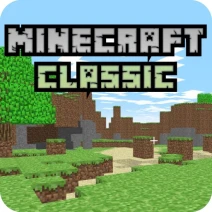
Minecraft Classic is a free online browser game that allows you to enjoy the original Minecraft experience with friends, unblocked and accessible from school or anywhere else.
Gameplay & Features
In Minecraft Classic, players can explore a blocky world, build structures, and interact with others in real-time. The game features nostalgic graphics and gameplay, making it a fun option for both old fans and new players.
Tips & Strategies
Utilize the build mode to create impressive structures and collaborate with friends for enhanced gameplay. Don’t forget to save your creations regularly!
Game Elements
- Blocks: The core building component, allowing players to create anything from simple homes to complex structures.
- Tools: Essential for manipulating the environment, including the ability to destroy and place blocks efficiently.
- Skins: Customize your character's appearance to stand out in the game.
- Environment: Explore diverse locations filled with various terrains that inspire creativity.
- Multiplayer Interaction: Play with friends in a shared space, enhancing the fun of building and exploring together.
Related & Series Games
If you enjoy Minecraft Classic, you might also like Bubble Trouble, a fun and engaging game where you pop bubbles, Bubble Struggle, a challenging adventure against bouncing bubbles, Bubble Trouble 2, the sequel with more levels, and Sonic Run, a fast-paced platformer featuring the iconic hedgehog.
FAQ
Is Minecraft Classic free to play?
Yes, Minecraft Classic is completely free to play online without any downloads required.
Can I play Minecraft Classic on my browser?
Absolutely! Minecraft Classic is designed to be played directly in your browser, making it accessible from any device.
Is it unblocked for schools?
Most schools allow access to Minecraft Classic, but it’s best to check your school's policy on gaming websites.